ITV-Blogs

The 7 Best AI App Builders in 2025

Explore the 7 best AI app builders in 2025. Make your app development process easy with this useful guide.

Creating a new bug-free app from scratch can consume a lot of time, even when it doesn’t require coding. From developing a user interface (UI) to setting up data sources needs a strong presence of mind, in-depth brainstorming, and smart planning, along with multiple sequences of testing.

How can you reduce these diligent efforts while coming up with a fully functional, intuitive and bug-free app? The origination of the AI can help you here. Although the use of AI can’t right away take you to the skies, it does fasten the process of creating an innovative app so you can manage the development of other essential parts of an app.

With our in-depth study regarding which AI-powered apps are taking center stage, we have come up with a certain good range of apps. Here are the 7 best AI app builders in 2026.

Also, read our blog: How Much Does Mobile App Development Cost?

Table of Contents

Top AI App Builders Revolutionizing Development in 2025

Softr

softr
Source: Softr

In the list of IT Vertical’s best AI app builders, first comes the Softr— the fastest app builder that runs on the no-code principle and drag-and-drop building blocks such as maps, tables, charts, calendars and forms. These features are customizable and pre-made. You can launch any app within a few hours without any need to build anything from the very start.

You will find hundreds of professionally created templates on Softr, as it mainly operates on templates with no extra charges. The templates are available in the form of multiple categories, such as team wikis, CRMS, blogs, donation trackers etc.

softr
Source: Softr

Softr AI building software implements solid, strong security protocols for their users, confirming complaints with GDPR and with SOC 2 Type II.

Softr fee: Free plan offered; Standard plan begins at $59/month

Read our blog: What is Digital Secure App? Features, Cost & More

microsoft powerapps
Microsoft PowerApps

Microsoft PowerApps

microsoft powerapps
Microsoft PowerApps

Microsoft is infusing the copilot features in all of its product lines, including its AI app builder PowerApps. The app builders offer, with no code requirement, a deep functionality as it applies function-based language for app logic, similar to the one that exists on MS Excel.

When you experience the PowerApps dashboard, you will explore there is a “prompt option” to build the app. Just submit your prompt, and it will provide an accurate database schema. This schema is the structure of your app’s data, including tables, columns/fields and relationships between tables.

The schema is auto-generated, and lets you modify it if needed using the Copilot chat window, which remains open on the app editor. PowerApps copilot chat feature is a very helpful feature that allows users to add, remove or change the fields using prompts.

Microsoft PowerApps fee: The Pro plan price is $20/month for a single user while accessing all the advanced features and services such as Dynamics 365 or Azure Cloud requires additional cost and the subscription you choose.

Quickbase

quickbase
Source: Quickbase

Among the best AI app builders in 2026 is Quickbase that develops apps for internal purposes such as Customer Relationship Management (CRM), Human Resource Management (HRM), and workflow automation as per the prompt you have given with accuracy. This app builder is still in beta version but gives a more detailed prompt as compared to others.

You can start using this app builder by entering your app requirements, industry and things you need to track, manage and report.  When you enter the prompt, you need to wait a few minutes (have some coffee) to develop the user interface (UI) and the tables.

quickbase
Source: Quickbase

After getting the app ready, you can add new views to display side-by-side and integrate the app with external systems or databases (e.g., spreadsheets, CRMs, or APIs) to pull in data.

Quickbase AI creation software becomes the center for all your business’s internal operation management, from managing workflows to projects and resources which makes it one of the best AI app builders of 2025.

Quickbase fee: $35/month for at least 20 users

google app sheet
Source: Google AppSheet

Google AppSheet

google app sheet
Source: Google AppSheet

Google spreadsheets originates the concept of managing and sorting any text data into tabular form. To extend its product lines, Google comes with a more advanced no-code development platform in the form of ‘Google AppSheet’ that lets users develop mobile, tablet and web apps with in few minutes. This is why it is listed on our top 7 AI app builders of 2026.

In the Google AppSheet, there is no prompt window anywhere. All the AI actions occur in the background because the AI-based engine reads and understands your columns and rows to identify your app needs, or your sheet structure will determine the layouts and functionality you will view on the screen.

There is also no prompt option in this app builder for customization. Google AppSheet control panels are complex to understand, but there are smartphone features such as QR-coding ideal for developing site-specific tools to perform location-based tasks or operations. But to use the prompt option, you need access to Duet AI (Google’s new AI engine) using a Google Workspace subscription. As well you can also have an opportunity to train an AI model to add prediction features or other relevant tools, such as intelligent document processing and character recognition.

 AppSheet fee: For Beginners starts at $5/user/month.

Construct

Constructs are designed for creating simple apps. When you start typing in the prompt section, it starts creating the on-page app considering the three essentials: a data model, a product requirement document and the interface components. Your on-page app converts into reality within a few minutes with input forms, display data lists and buttons.

At first, you will see a black outline of all features, either be it buttons or lists. To modify any feature, you need to rewrite the prompt to modify any visual piece of the app, or you need to give multiple prompts to make your app visually appealing.

Also, on the left-side menu, there is an envelope option. When you click on it, you will find recurring tasks and notifications. There is a template option on the home page as well, with simple features such as fitness trackers and personal CRM bets for those who wish to build small team internal tools or personal apps.

Within the builder, you won’t find any complexity of API, and data integration. After all, the app is meant to facilitate those who want a simple app within 30 minutes of the timeframe.

Construct fee: beta is free. As of now, no pricing data is available.

Pico

pico
Source: Pico

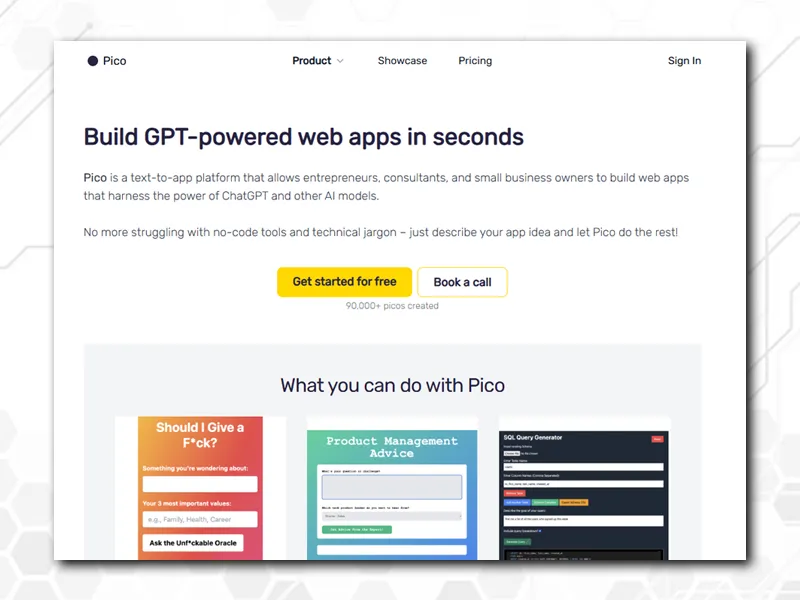
AI-powered Pico, another useful AI-building software, gives a pleasant experience to consultants, entrepreneurs, and small business owners in creating any app within in few minutes.

The moment you begin to add your prompt, a line appears displaying AI creating the code in real-time. This AI-generated code smoothly moves between CSS, HTML and JavaScript while, on the other side, your app slowly turns into reality. If you are well-versed with the coding, you are allowed to tweak it; otherwise, use simple English language that Pico understands.

pico
Source: Pico

During this process, you can write additional prompts to modify anything within the app, such as the input fields, buttons, and backgrounds displayed on the screen. If you are surrounded with troubles, anytime you can reverse the app into the former prompt using the revert option.

Pico gives few settings to change visual properties, app style, layouts or design. Pico allows API connections as well, but it is not simple to set them up. Once your app is ready to go, you can publish it using the provided link right away.

Pico fee: Premium plan starts at $29/month.

create
Source: Create

Create

create
Source: Create

The last AI app builder in the list of IT Verticals is ‘Create,’ an extremely open-ended AI creation software along with Native integrations, including OpenAI. Using Create, you can come up with a new whole thing using a single prompt—a main advantage.

On the right side you will see an input field welcoming you to type a prompt. We suggest rather than wiring your prompt for your first draft here, use a DOC first. What you do is first use a chatGPT to understand what features you need in your app, such as learning the app use interface to understand interactive and visual elements with every detail.

This will help the app builder to perform the job at its best. Once done, paste it on the field and a setback for a while, and view at the top-left side, a “building” message appearing, which is understanding your prompt and, on that basis, building the app. Also, ‘Create’ is easy to use app builders that allows you to publish your app right away via ‘sharing’ option.

But ‘Create’ comes with certain limitations. It doesn’t save data, so you need to complete everything in a single session. ‘Create’ doesn’t allow users to log in, so not ideal for apps that need to maintain information over time.

Create fee: The Pro plan is $99/month.

FAQs: AI App builder

AI app builders are Android and iOS-specific app makers that create simple to complex apps with features like AI prompts.

AI app builders use artificial intelligence to simplify app creation to build apps without coding. They offer drag-and-drop interfaces and natural language processing to perform actions such as automating design, logic, and deployment for quick, accessible app development.

Yes, AI app builders are very convenient for beginners, as no tech knowledge is needed.

These AI app builders have minimal coding experience with pre-built components, drag-and-drop interfaces, and prompt fields, making it easy for learners to build professional apps without writing code but not preferable to build app that requires a data persistence and advanced features.


Final Thoughts

Creating apps using AI is in the initial stage. Still, AI is making a jaw-dropping impression among users. These AI app builders will, in the near future, take a noble place as a powerful tool in building the most intuitive, full-functional and user-friendly apps.

However, these 7 best AI app builders in 2025 won’t take you to the final stage immediately but for surely speed up the app development process.

Feeling reluctant to build an app due to heavy cost and resources needed, No worries. Contact IT Verticals for the most reliable and professional app development services in the USA.

Read our blog: Mobile App Development Process (Step-by-Step Guide)